
Google just turned your Business Profile photo gallery into a mini analytics dashboard. Every photo and every video you've uploaded now shows its own view count — so for the first time you can see exactly which builds, services, and before/afters actually pull eyeballs. For a visual-first industry like ours, this is a bigger deal than it looks.
What actually changed
Google rolled out a new feature (late May 2026) that displays the total number of views on each individual photo and video inside your Google Business Profile's "Photos and videos" section. Previously you could only see aggregate photo views buried in the Performance tab. Now there's a small eye icon and a number on each thumbnail — 995 views, 1.85k views, 82 views, and so on.
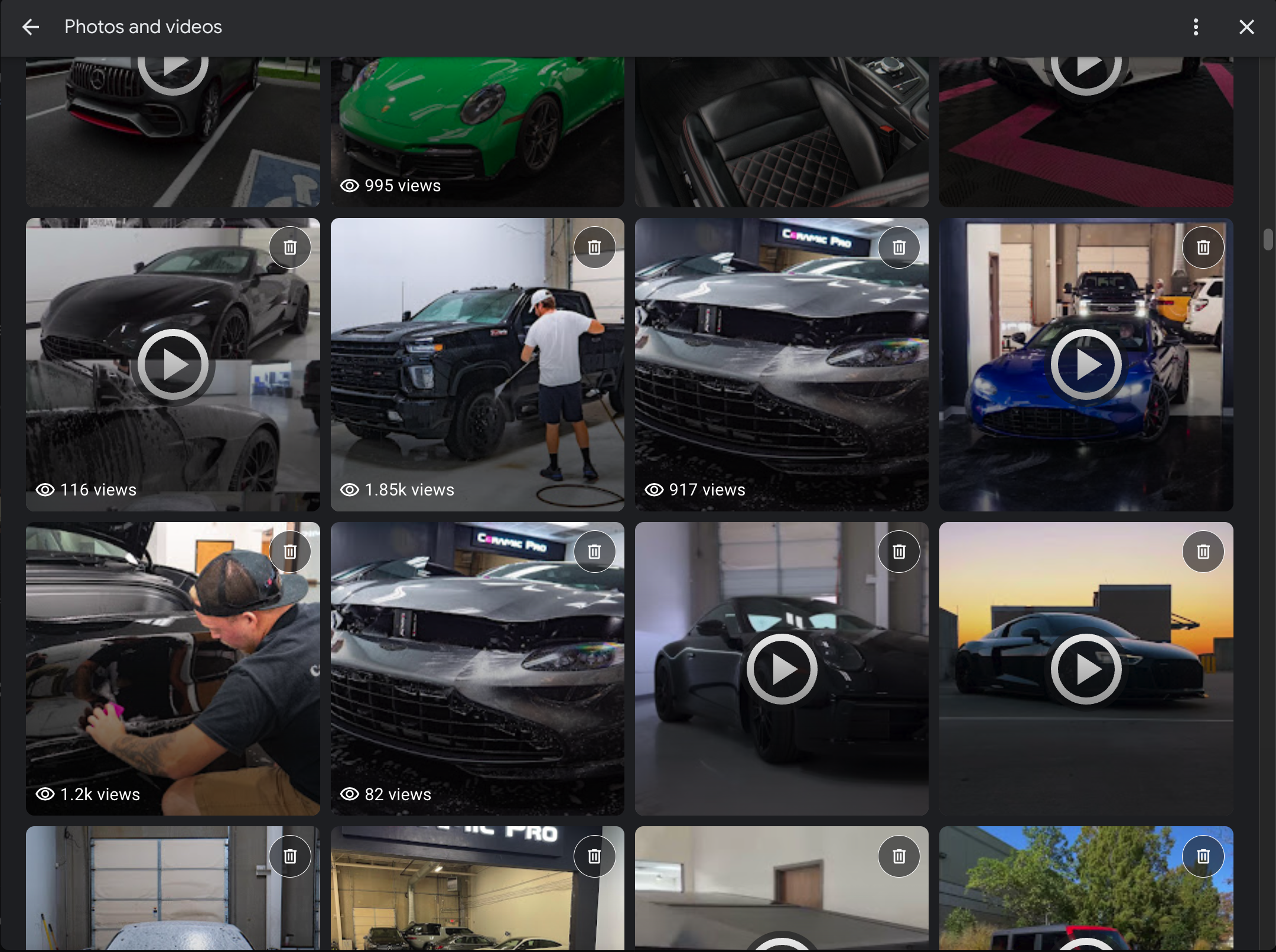
Where to find it
- Open your Business Profile (search your business name while signed in as the owner, or use the Google Business Profile manager).
- Go to the Photos / Photos & videos section.
- Look at each thumbnail — you'll see an eye icon + a view count on photos and videos you've uploaded.
Why this matters more for detailing shops than almost anyone
Detailing, PPF, ceramic coating, and window tint are sold with the eyes. Nobody books a full front-end PPF wrap or a multi-stage paint correction off a paragraph of text — they book it after they see a mirror-finish black hood, a self-healing film demo, or a satin-wrapped exotic. Until now you were guessing which of those shots was doing the heavy lifting. This update removes the guesswork.
There are two reasons to care:
- Engagement is a ranking signal in 2026. Google's local algorithm now leans harder on how people interact with your profile — photo views, clicks, and direction requests — not just brand size. A small shop with a highly engaged, fresh gallery can out-rank a bigger neglected competitor. Knowing your top media tells you what to feed the algorithm more of.
- It's free creative research. Your photo views are a live audience poll. If your matte-black builds crush your daily-driver sedans, that's your audience telling you what content to shoot, post, and run ads around — on Google, Instagram, and YouTube alike.
How to turn view counts into more booked jobs
1. Find your "hero" media
Sort your gallery mentally by views. Identify the 3–5 photos/videos with the highest counts. Note the common thread: vehicle type (exotic vs. truck vs. EV), service (ceramic vs. PPF vs. correction), and shot style (in-bay glamour vs. process/action vs. outdoor sunset).
2. Double down on what wins
Shoot more of that. If a Porsche in your booth pulls 10x the views of a parking-lot sedan, prioritize studio-style booth shots of high-interest vehicles. Reorder your gallery so your highest performers sit near the front — first impressions on the profile drive the click.
3. Replace, don't just delete, the duds
Low-view photos aren't automatically "bad" — newer uploads simply haven't had time to accumulate views. Before pruning, give recent media a few weeks. When you do clean up, swap blurry or off-brand shots for fresh, high-resolution ones rather than leaving gaps.
4. Feed the winners into the rest of your funnel
Your best-performing GBP media is pre-validated content. Re-cut it into Google Posts, Instagram Reels, and YouTube Shorts. You already know it grabs attention — now make it work everywhere.
5. Keep the gallery fresh on a schedule
Aim for new media every 1–2 weeks. Stale profiles lose visibility fast in 2026, and a steady upload cadence keeps your view data meaningful month over month.
The 15-minute action plan
- Open your Business Profile and confirm whether view counts are live for you.
- Screenshot your current gallery so you have a baseline.
- Identify your top 5 and bottom 5 performers.
- Reorder so your top performers lead the gallery.
- Schedule one shoot this month focused on whatever vehicle/service is winning.
- Re-purpose your #1 photo or video into a Google Post and a Reel/Short this week.
Watch the full walkthrough
I break this update down step-by-step in the video below, using a real detailing profile so you can see exactly where the numbers show up:
Prefer to watch on YouTube? Watch "Google Business Profile Photo & Video View Counts" here →
FAQ
- Does every Google Business Profile show photo and video view counts now?
- Not yet. Google is rolling the feature out in phases, so some owners see per-photo and per-video view counts while others don't. If you don't see them, check back over the coming weeks.
- Where do I see the view counts?
- In the "Photos and videos" section of your Business Profile, viewed while signed in as the owner. Each photo and video you uploaded shows an eye icon and its total view count.
- Do photo views help my local ranking?
- Indirectly. Google's 2026 local algorithm weighs engagement signals like photo views, clicks, and direction requests more heavily. Strong, fresh media that earns views supports visibility — but it works alongside reviews, categories, and a complete profile, not on its own.
- Should I delete photos with low view counts?
- Not automatically. Recent uploads simply haven't had time to gather views. Give new media a few weeks, then replace genuinely weak or outdated shots with fresh high-quality ones.